
Chatbots vs AI Copilots vs AI Agents
They all "use AI." They all "chat." But they are doing very different things and the difference matters more than you think.

Not long ago, I was in a conversation with a colleague about a copilot feature. Mid-conversation, I noticed a shift. The examples and use cases described drifted into chatbot use cases. They weren’t being careless. They genuinely didn’t see the line.
I had to pause and say: look, I know they all run on AI, I know they all feel like “talking to a machine”, but they are doing fundamentally different jobs.
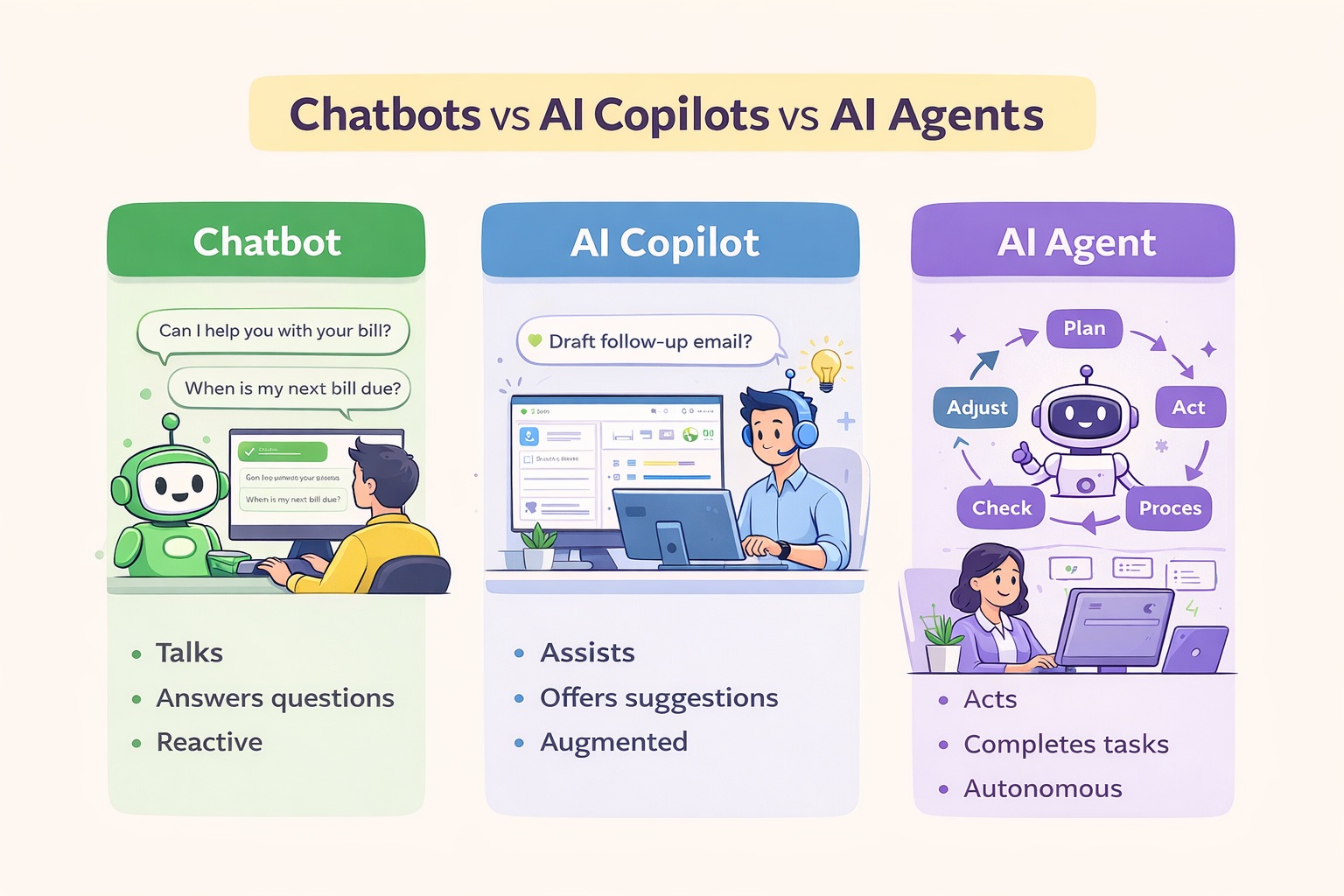
And once I walked through the distinction, something clicked. The confusion wasn’t a knowledge gap. It was a framing gap. Nobody had ever told them the jobs were different.
That conversation stuck with me because if someone close to the technology can mix these up, then the confusion is everywhere. And it matters. Choosing the wrong tool doesn’t just waste money. It sets the wrong expectations, frustrates teams, and leaves real value on the table.
So here’s the clearest breakdown I can give you: three tools, three very different jobs, and why understanding the difference will change how you think about AI at work.
The Chatbot: The One That Talks
Chatbots have been around longer than most people realise. At their core, they are programs designed to simulate conversation, written or spoken. The humble chatbot on a retail website asking, “Can I help you find something?” is one. So is the voice that picks up when you call your bank.
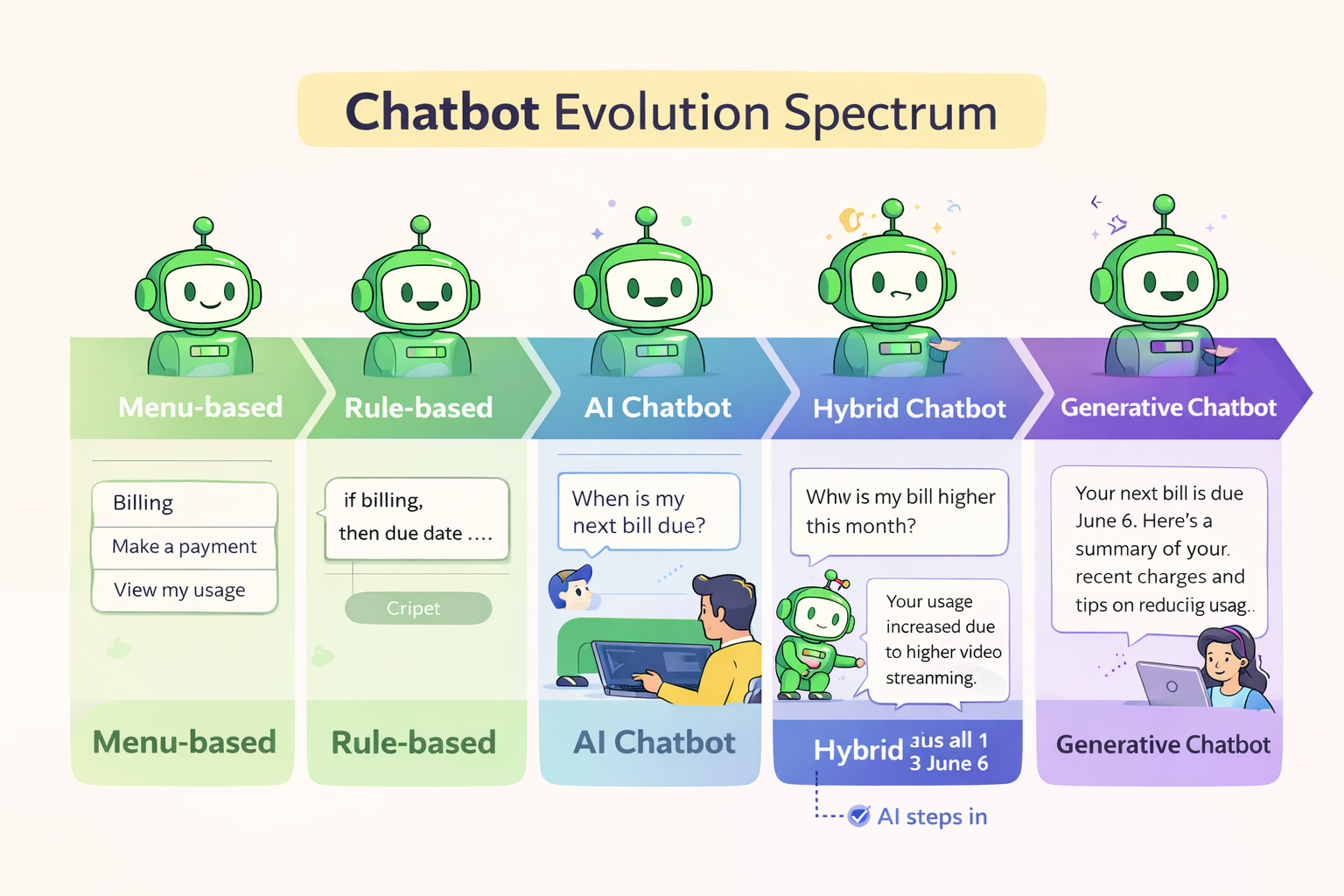
But not all chatbots are created equal. There’s a whole spectrum:
Menu-based chatbots are the simplest kind; they present buttons and follow a decision tree. Click “Billing,” then “Make a payment,” and off you go. Great for transactional tasks, not great for anything else.
Rule-based chatbots work with “if this, then that” logic. They can handle a wider range of questions, but only if someone has already predicted those questions. Anything outside the script and they freeze up.
AI-powered chatbots use natural language understanding (NLU) to interpret what you’re actually saying — not just looking for keywords. They can ask clarifying questions. They can handle ambiguity. They remember context within the conversation.
Hybrid chatbots sit between the rule-based and AI tiers, combining structured menu logic with machine learning capabilities. The menu handles predictable, high-volume interactions cleanly; the AI layer picks up where the script runs out. The result is a bot that is reliable enough for routine tasks and flexible enough for messier ones. In practice, this is what many production chatbots look like today.
Generative AI chatbots are the newest tier. They don’t just retrieve pre-written answers — they generate new responses, adapt to your tone, and can create content on the fly.
It’s worth pausing on the hybrid model for a moment, because it’s easy to skip over. There’s a temptation to treat this spectrum as a straight upgrade path — as if everyone should race straight to generative AI. But structure has real value. A well-designed hybrid gives businesses the speed and predictability of rules where they need it, and the intelligence of AI where they don’t. That balance often matters more than chasing the most advanced option available.
The chatbot’s job is to steer the conversation. It answers, guides, and hands off. It is reactive. It waits for you to speak first and responds from there.
Think of a chatbot as a highly knowledgeable receptionist. Brilliant at answering questions, terrible at doing your tax returns.
The AI Copilot: The One That Helps You Work
Now we move up a level. The AI Copilot isn’t just having a conversation with you, it’s sitting inside the tools you already use, watching what you’re doing, and helping you do it better.
The name is deliberate. Like a copilot in an aeroplane, it doesn’t take the controls, you do. But it’s watching the instruments, flagging anomalies, and handing you the right information at the right moment so you can make better decisions faster.
A copilot is a conversational interface built on large language models (LLMs) that pulls context from across your software ecosystem, your emails, your CRM, your documents, your data and uses that to guide and assist you in real time.
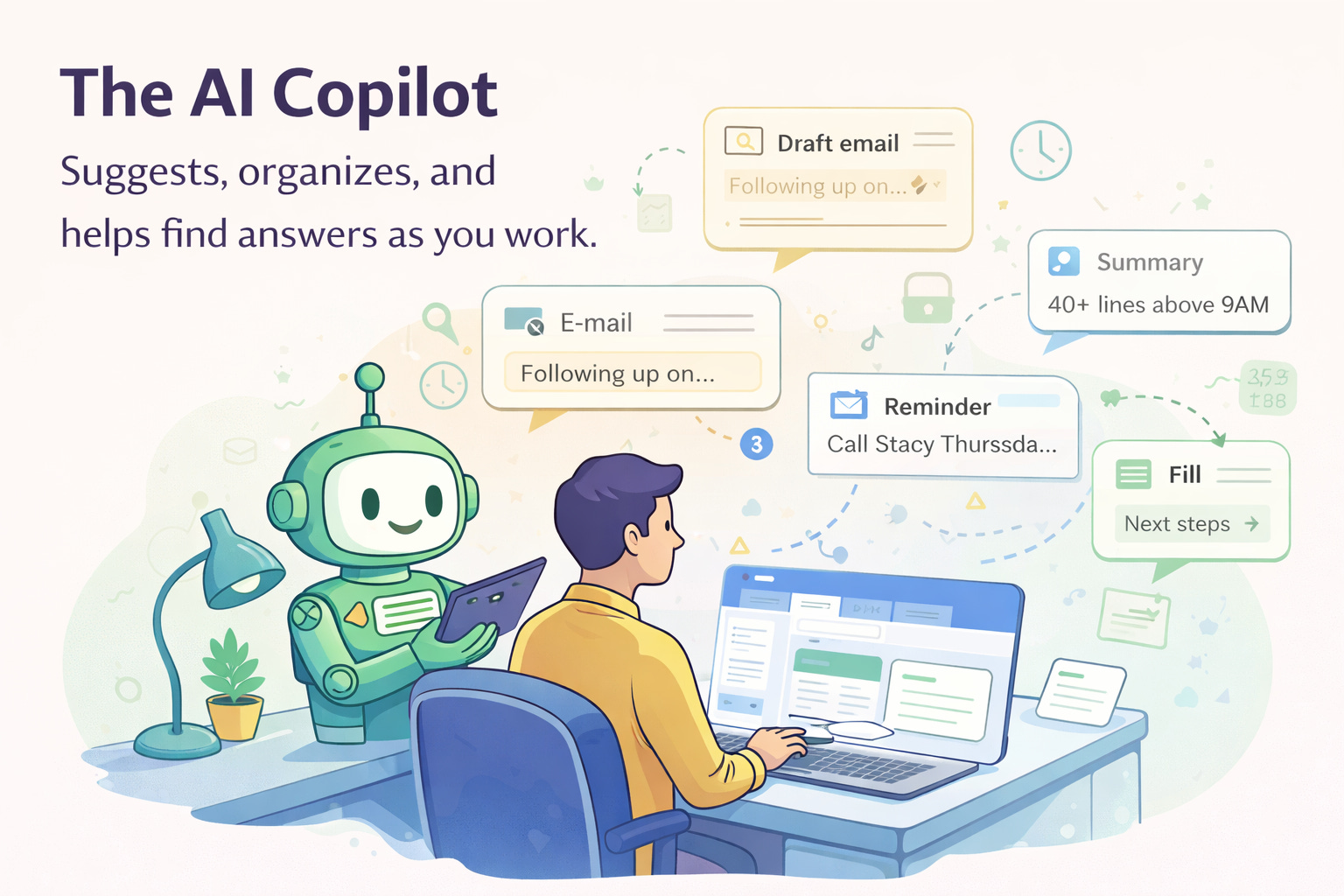
In practice, copilots are the things that:
Draft that follow-up email based on your meeting notes
Summarise a 40-page report into three bullet points before your 9 am
Spot that a customer account is showing churn signals before your sales rep notices
Suggest the next field to fill in a CRM form based on what you’ve already typed
Crucially, the copilot doesn’t do things for you without asking. It suggests. It drafts. It highlights. You stay in the driver’s seat; it just makes the drive smoother.
“An AI copilot isn’t meant to replace people, it’s there to help your team find answers quickly, avoid redundant tasks, and make smarter decisions.”
For customer experience teams, this is transformative. A support agent with a copilot can triage complex tickets faster, access a customer’s full history in seconds, and get real-time suggestions on how to resolve an issue, without ever leaving their inbox.
The AI Agent: The One That Gets Things Done
And now we get to the one that’s genuinely changing the game.
An AI agent is not a conversational tool. It’s an operational one. It’s a system designed to complete goals autonomously, across multiple steps, using whatever tools and data it needs to get there.
Where a chatbot waits to be asked, and a copilot helps you act, an AI agent acts. It can break a complex task into subtasks, execute each one, track what worked and what didn’t, and adjust along the way, all without a human holding its hand through every step.
Here’s what that looks like in practice. You tell an AI agent: “Process all new customer onboarding requests that came in this week.” The agent:
Reads the intake forms
Cross-references your CRM for existing customer data
Creates accounts, assigns reps, and sends welcome emails
Flags any edge cases that need human review
Updates your dashboard when done
You didn’t click a single button. The agent planned, executed, and reported back.
This is possible because agents combine several capabilities at once: they use LLMs to reason and plan; they call external tools and APIs to take real actions; they retain memory across steps to maintain context; and they apply guardrails, permissions, approval flows, and validation checks to stay within safe boundaries.
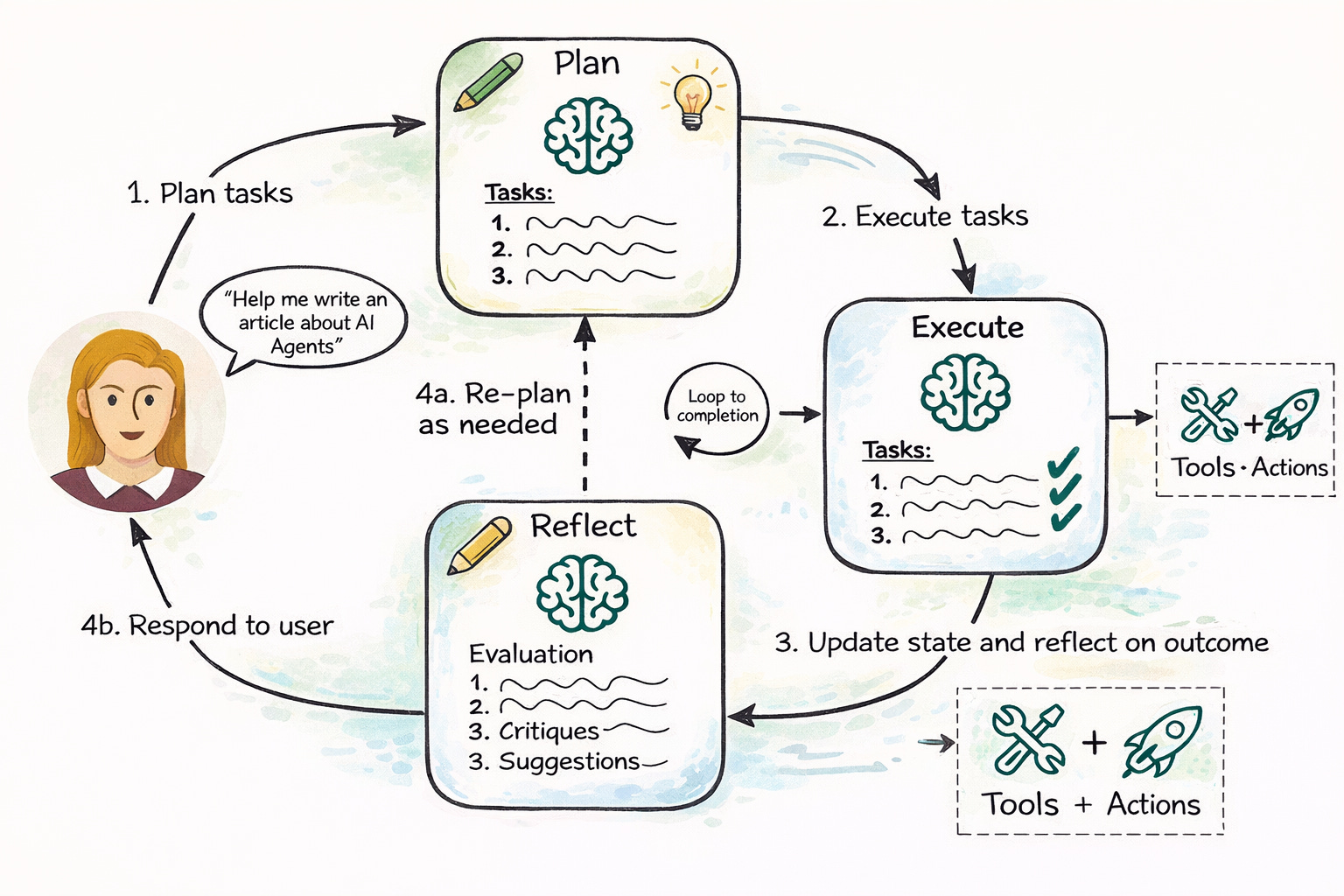
If a chatbot is a receptionist and a copilot is a highly capable colleague, an AI agent is the department that runs itself checking in with you only when it genuinely needs a judgment call.
Which One Do You Actually Need?
If you’re figuring out where to start, here’s a rough guide based on your team and use case:
Support, IT helpdesk, customer experience at scale: Start with a well-designed AI chatbot. Handle volume first.
Sales, analysts, operations, engineering: A copilot will dramatically speed up your team’s existing workflows without changing how they work.
Finance, compliance, back-office automation, complex multi-step ops: This is agent territory. The ROI is real, but so is the implementation work.
Chatbots talk. Copilots assist. Agents execute.
The future of customer experience will be built by the teams who understand that difference, and deploy accordingly.
That’s my view for the week. See you next week 😉